Definition
Defines a context to execute all the steps in a mule flow. The scope enables none or all functionality. If any error occurs in any of the step, the whole flow is reverted.
Transactions management in mule has always been a topic of interest for many. It gives the flexibility of using a pre-defined rollback strategy if doing multiple database operations. Though the Transactional scope is only available when using Database Connector or JMS connector.
The usual requirement in an integration platform is calling multiple systems, mostly over HTTP. Though mule doesn’t provide a rollback strategy over HTTP connectors. Also there is no replay-back feature which can be used if an exception occurs.
In this blog post I am doing to discuss one of the strategy to overcome these problems. Also how this strategy provides a persistent way to store data in case of failures and execute them at a later times.
Let’s take a real world scenario. A user lands on the your website and creates a profile. There are 3 operations which are to be done.
1. Create the user in database
2. Create the user in salesforce
3. Send a confirmation email
Assume that email system in place is an un-reliable system as it is up only 60% of the time. When all the 3 steps are completed than only the flow is deemed to be successful else it is a failure.
Let’s first create a traditional mule flow.
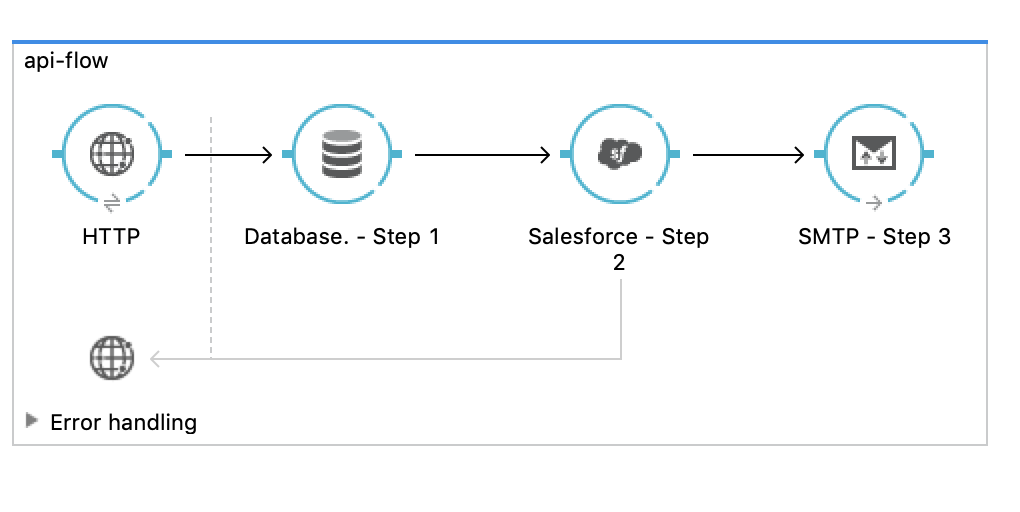
As can see here, if Step 1 is successful but Step 2 is a failure. The error is caught though to rollback there should custom exception handling code required to be developed. Also maybe Step 2 only failed because of a network connection. Since the message is already consumed by the exception strategy there is no way it can be resend.
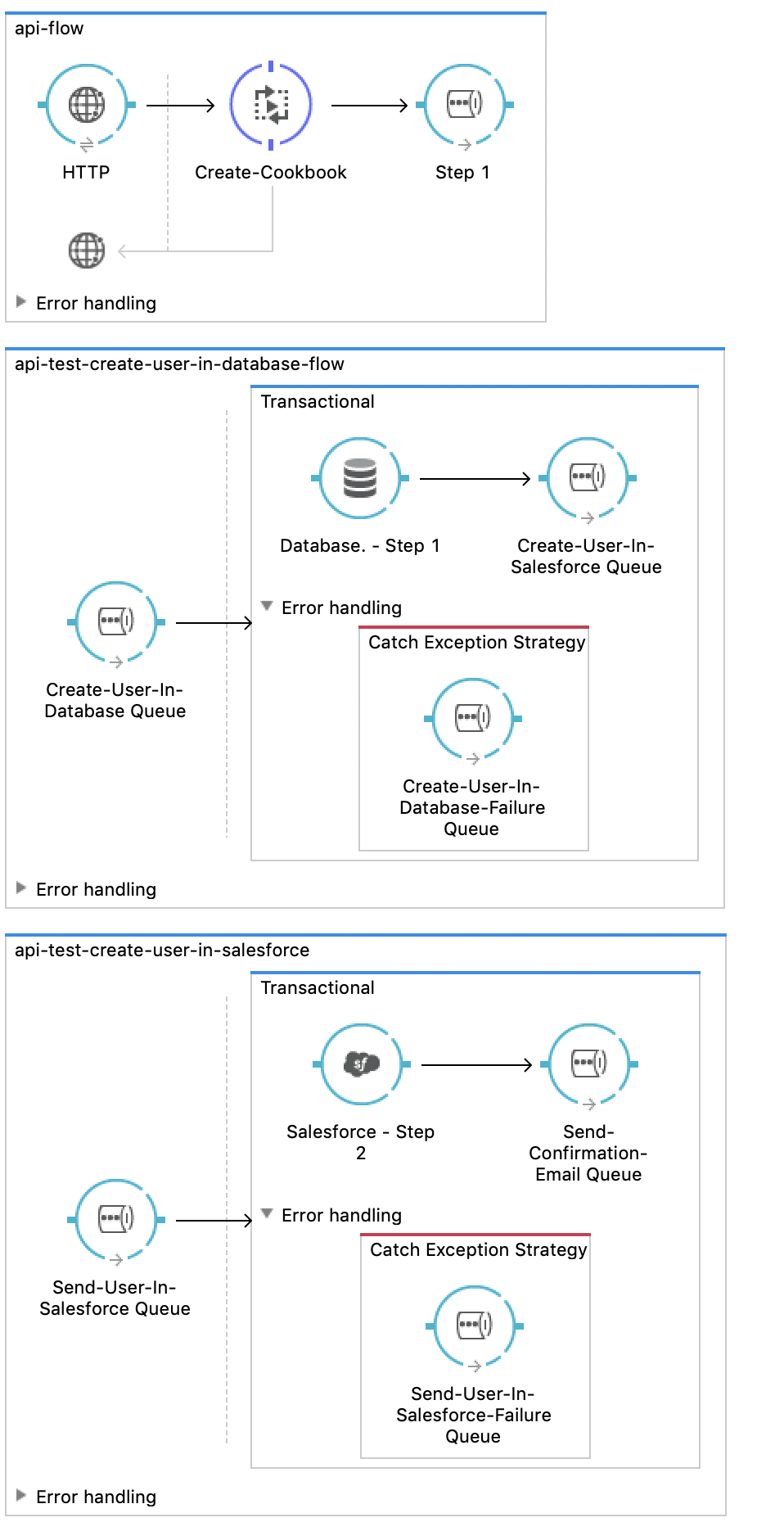
Now, let’s try to solve this problem with a bit smarter approach. For this implementation a queuing system will be used. For the sake of brevity the assumption made here is the use of ActiveMQ. As the steps are already known let’s create a cookbook. In this cookbook, the steps and the payload is passed as a json message and consumed at each step.
{
    "steps": [
        "create-user-in-database",
        "create-user-in-salesforce",
        "send-user-confirmation-email"
    ],
    "nextStep": "create-user-in-database",
    "payload": {
        "firstName": "Alex",
        "lastName": "Caron",
        "email": "alexcaron@sharklasers.com"
    }
}
As activeMQ provides functionality of creating queues on the fly based on name, the nextStep parameter value will help in creating them. There is be an associated failure queue with each nextStep queue. For eg: if a queue will be created called create-user-in-database; corresponding failure queue will created with the name create-user-in-database-fail.
Success Scenario Message Flow
Step 1
```javascript { "steps": [ "create-user-in-database", "create-user-in-salesforce", "send-user-confirmation-email" ], "nextStep": "create-user-in-database", "payload": { "firstName": "Alex", "lastName": "Caron", "email": "alexcaron@sharklasers.com" } } ```
Step 2
```javascript { "steps": [ "create-user-in-database", "create-user-in-salesforce", "send-user-confirmation-email" ], "nextStep": "create-user-in-salesforce", "payload": { "firstName": "Alex", "lastName": "Caron", "email": "alexcaron@sharklasers.com", "id": "60d0adcf-5a05-4b5c-ae22-a54fc40a9b92" } } ```
Step 3
```javascript { "steps": [ "create-user-in-database", "create-user-in-salesforce", "send-user-confirmation-email" ], "nextStep": "send-user-confirmation-email", "payload": { "firstName": "Alex", "lastName": "Caron", "email": "alexcaron@sharklasers.com", "id": "60d0adcf-5a05-4b5c-ae22-a54fc40a9b92", "salesforceId": "5003000000D8cuI" } } ```
The following steps talk about the implementation
- On receiving payload, create the json message for
cookbook. - Send the message, to the queue mentioned in
nextStepkey. - If the processing of the message is successful, do;
- Update the
nextStepkey - If required update the payload with more information
- Update the
- Repeat step 2 and 3 untill reaching the final step.
- If there are any failures in the processing of message at any step, the
cookbookis sent to the failure queue of that step. - A message in failure queue can be consumed again, by just forwarding it back to the original queue (
create-user-in-database-fail→create-user-in-database)
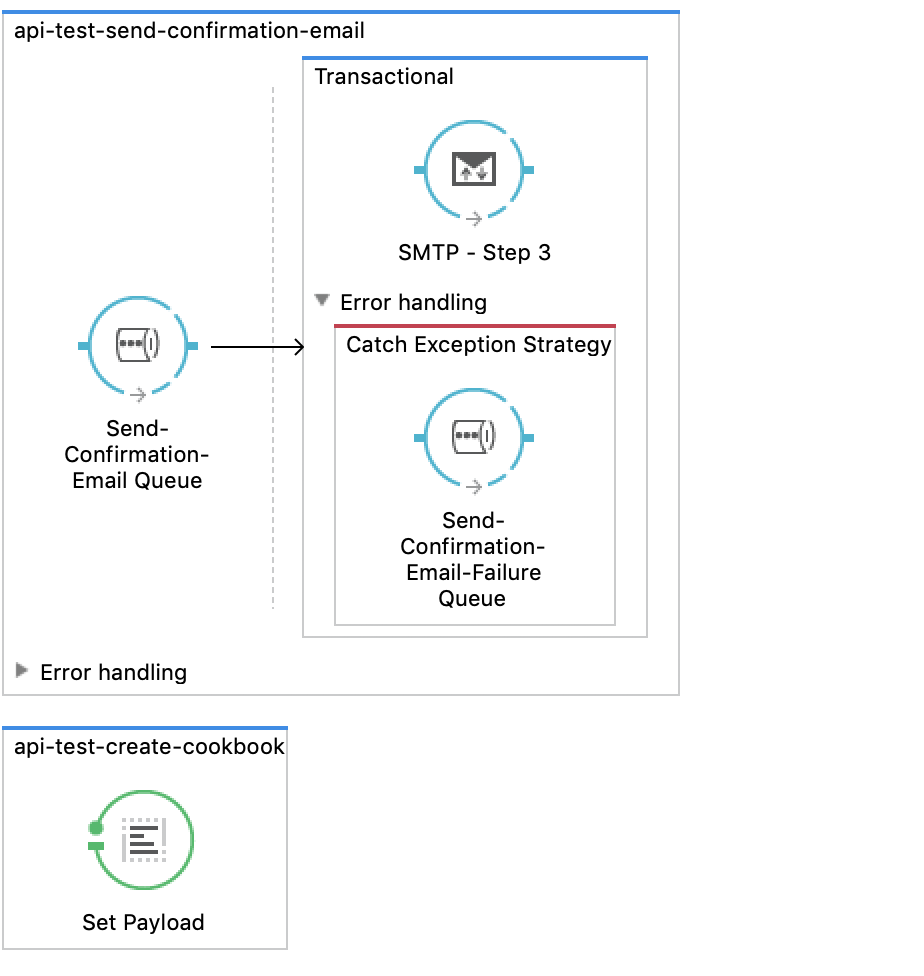
Please find below a sample implementation of discussed strategy:
Pros:
- This approach provides generic methodology in handling transaction scope with multiple system involved.
- Since the queues are created on the fly, there is no dependency on infrastructure team.
- This approach provides a replay-back feature which ensures no data loss and helps in keeping data integrity.
Cons:
- There is no complete rollback. There is manual intervention required if a step is having constant failures on consuming a certain message.
- The system’s reliability depends on the queuing server, if the server is down the whole flow crashes.
Hope this helps in giving an idea on how can transaction management be implemented in mule. Let me know in comments for any possible questions or feedback.